
// Overview
Abstract
In this project I created a long-range wireless communication system using two ESP32 boards and NRF24L01 modules. When the button is pressed on the transmitter side, the receiver instantly turns on the LED wirelessly
// Goals
Objective
- Build a 6 channel Transmitter&Receiver system
// Hardware
Components
ESP32
NRF24L01
2x NRF24 Adapter
Capacitor 100µF
Breadboard & Wires
// How It Works
Working Principle
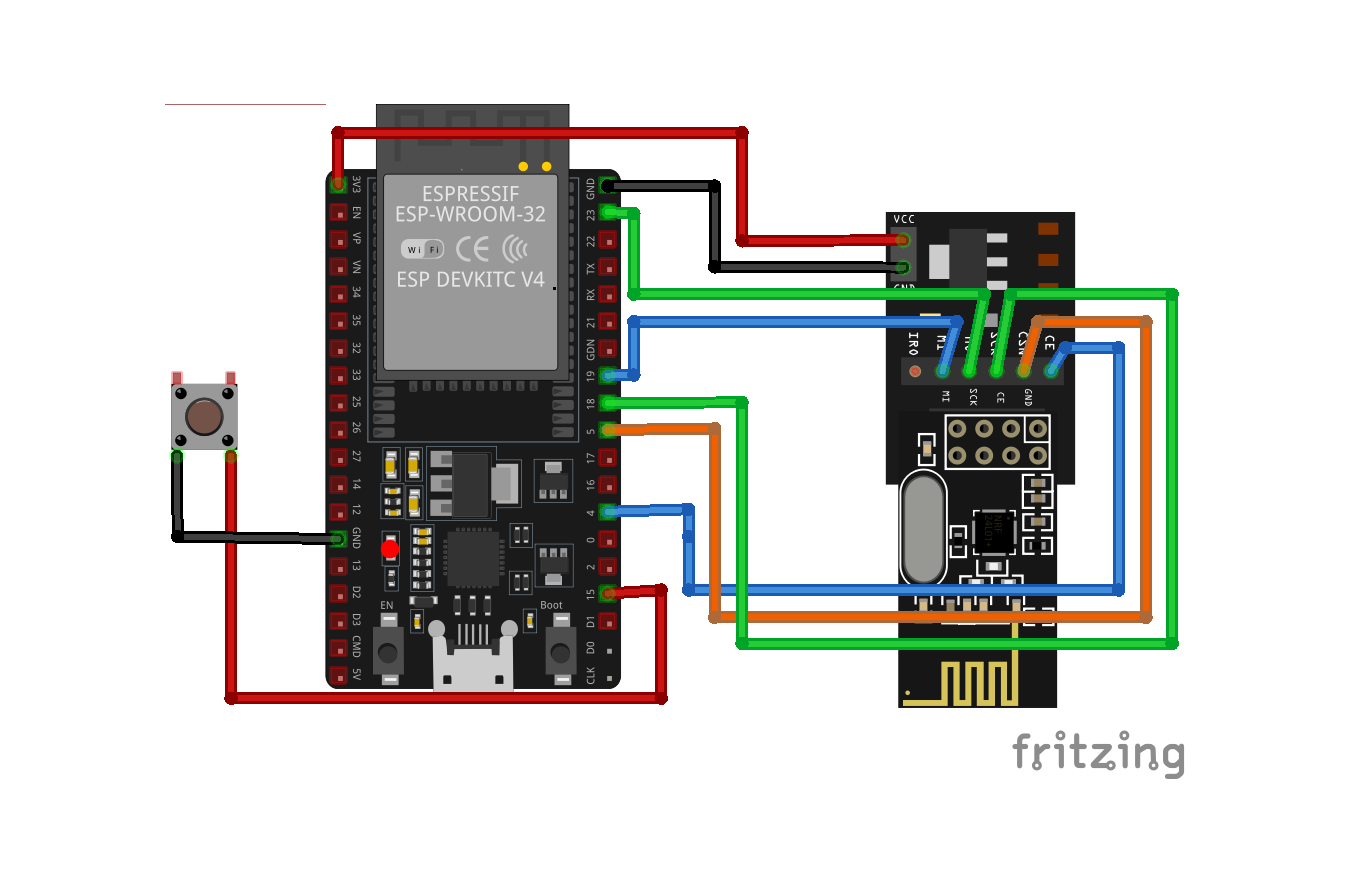
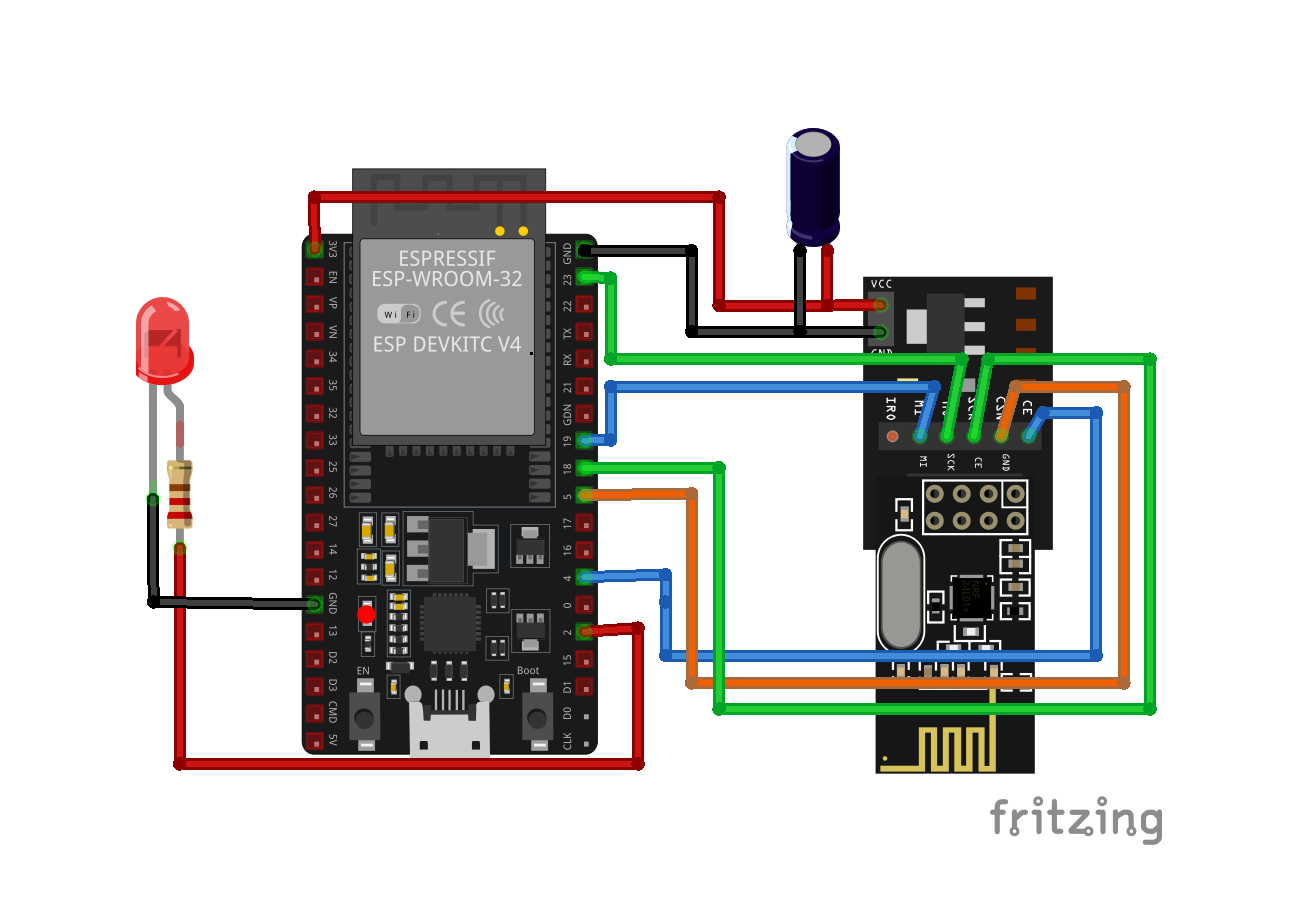
This project demonstrates wireless communication between two ESP32 boards using NRF24L01 modules. When the button on the transmitter side is pressed, a signal is sent wirelessly to the receiver, which instantly turns on the LED. The NRF24L01 modules use 2.4GHz RF communication for fast and low-latency data transfer.
// Source Code
Transmitter Code for ESP32
#include <Arduino.h>
#include <SPI.h>
#include <nRF24L01.h>
#include <RF24.h>

RF24 radio(4, 5);

const byte address[6] = "00001";

const int buttonPin = 15;

void setup() {
  Serial.begin(115200);

  pinMode(buttonPin, INPUT_PULLUP);

  SPI.begin(18, 19, 23, 5);

  if (!radio.begin()) {
    Serial.println("NRF ERROR");
    while (1);
  }

  radio.openWritingPipe(address);

  radio.setPALevel(RF24_PA_LOW);

  radio.stopListening();

  Serial.println("TRANSMITTER READY");
}

void loop() {

  bool buttonState = !digitalRead(buttonPin);

  bool ok = radio.write(&buttonState, sizeof(buttonState));

  if (ok) {
    Serial.print("SEND: ");
    Serial.println(buttonState);
  } else {
    Serial.println("SEND FAIL");
  }

  delay(50);
}

}
// Source Code
Receiver Code for ESP32
#include <Arduino.h>
#include <SPI.h>
#include <nRF24L01.h>
#include <RF24.h>

RF24 radio(4, 5);

const byte address[6] = "00001";

const int ledPin = 2;

void setup() {

  Serial.begin(115200);

  pinMode(ledPin, OUTPUT);

  SPI.begin(18, 19, 23, 5);

  if (!radio.begin()) {
    Serial.println("NRF ERROR");
    while (1);
  }

  radio.openReadingPipe(0, address);

  radio.setPALevel(RF24_PA_LOW);

  radio.startListening();

  Serial.println("RECEIVER READY");
}

void loop() {

  if (radio.available()) {

    bool receivedData;

    radio.read(&receivedData, sizeof(receivedData));

    digitalWrite(ledPin, receivedData);

    Serial.print("RECEIVED: ");
    Serial.println(receivedData);
  }
}

}