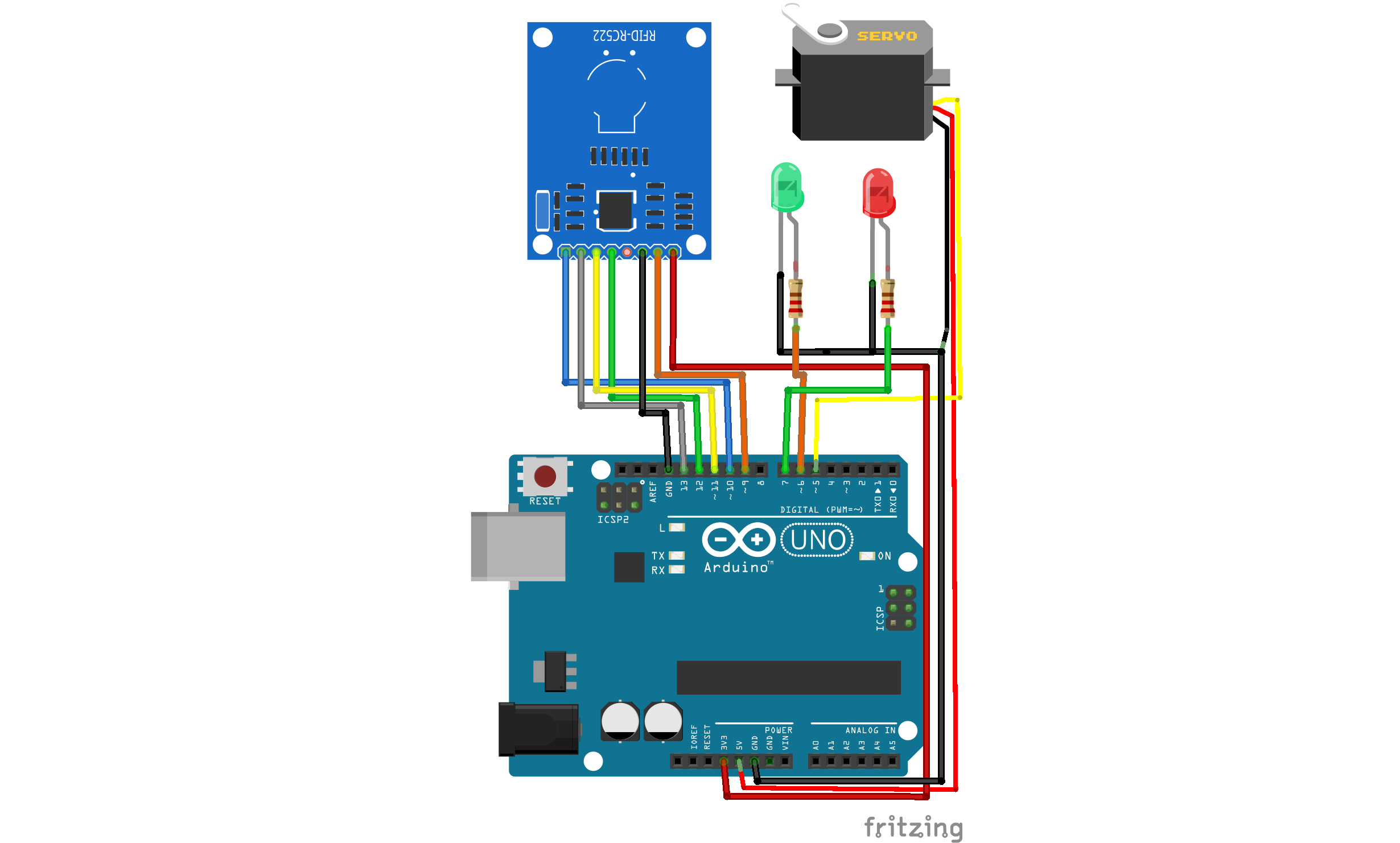
// Overview
Abstract
This project demonstrates a simple RFID access control system using an Arduino Uno and an MFRC522 RFID module. When an authorized RFID card is detected, the system activates a servo motor to simulate unlocking a door and turns on a green LED. If an unauthorized card is scanned, a red LED indicates access denial.
// Goals
Objective
- Build a basic RFID security system
- Learn RFID communication with Arduino
- Control physical devices based on authentication
// Hardware
Components
Arduino Uno
MFRC522 RFID
Servo Motor
Green LED
Red LED
Resistors
Breadboard & Wires
// How It Works
Working Principle
The MFRC522 RFID module reads the UID of an RFID card. The Arduino compares the UID with a predefined authorized UID stored in the code. If the UID matches, the servo motor rotates to unlock the mechanism and the green LED turns on for 3 seconds. If the UID does not match, the system denies access and activates the red LED.
// Source Code
Code
#include <SPI.h>          // Library for SPI communication with the RFID module
#include <MFRC522.h>      // Library for working with RC522 RFID modules
#include <Servo.h>        // Library for controlling servo motors

// Define pins for the RFID module
#define SS_PIN 10         // Slave Select (CS) pin for RFID
#define RST_PIN 9         // Reset pin for RFID

MFRC522 mfrc522(SS_PIN, RST_PIN);  // Create an RFID object
Servo myServo;                      // Create a servo object

// LED and servo pins
int greenLED = 6;                   // Green LED for authorized access
int redLED   = 5;                   // Red LED for denied access
int servoPin = 3;                   // Pin for connecting the servo

// Authorized card UID (example)
byte authorizedUID[4] = {0xDE, 0xAD, 0xBE, 0xEF};

void setup() {
    Serial.begin(9600);             // Start serial communication
    SPI.begin();                    // Initialize SPI bus
    mfrc522.PCD_Init();             // Initialize the RFID reader

    pinMode(greenLED, OUTPUT);
    pinMode(redLED,   OUTPUT);

    myServo.attach(servoPin);
    myServo.write(0);               // Set servo to initial position (0°)

    Serial.println("Scan RFID card...");
}

void loop() {
    if (!mfrc522.PICC_IsNewCardPresent()) return;
    if (!mfrc522.PICC_ReadCardSerial())   return;

    boolean access = true;

    // Compare scanned UID with authorized UID
    for (byte i = 0; i < 4; i++) {
        if (mfrc522.uid.uidByte[i] != authorizedUID[i]) {
            access = false;
        }
    }

    if (access) {
        digitalWrite(greenLED, HIGH);
        digitalWrite(redLED,   LOW);
        myServo.write(180);         // Rotate servo to open position
        delay(3000);
        myServo.write(0);           // Return to closed position
        digitalWrite(greenLED, LOW);
    } else {
        digitalWrite(redLED, HIGH);
        delay(2000);
        digitalWrite(redLED, LOW);
    }

    mfrc522.PICC_HaltA();           // Halt communication with card
}
✓ Results
- Reliable RFID card detection
- Clear visual access indication
- Simple and effective access control
↑ Future Improvements
- Multiple authorized cards
- LCD display for user feedback
- WiFi logging using ESP32
- Mobile app integration