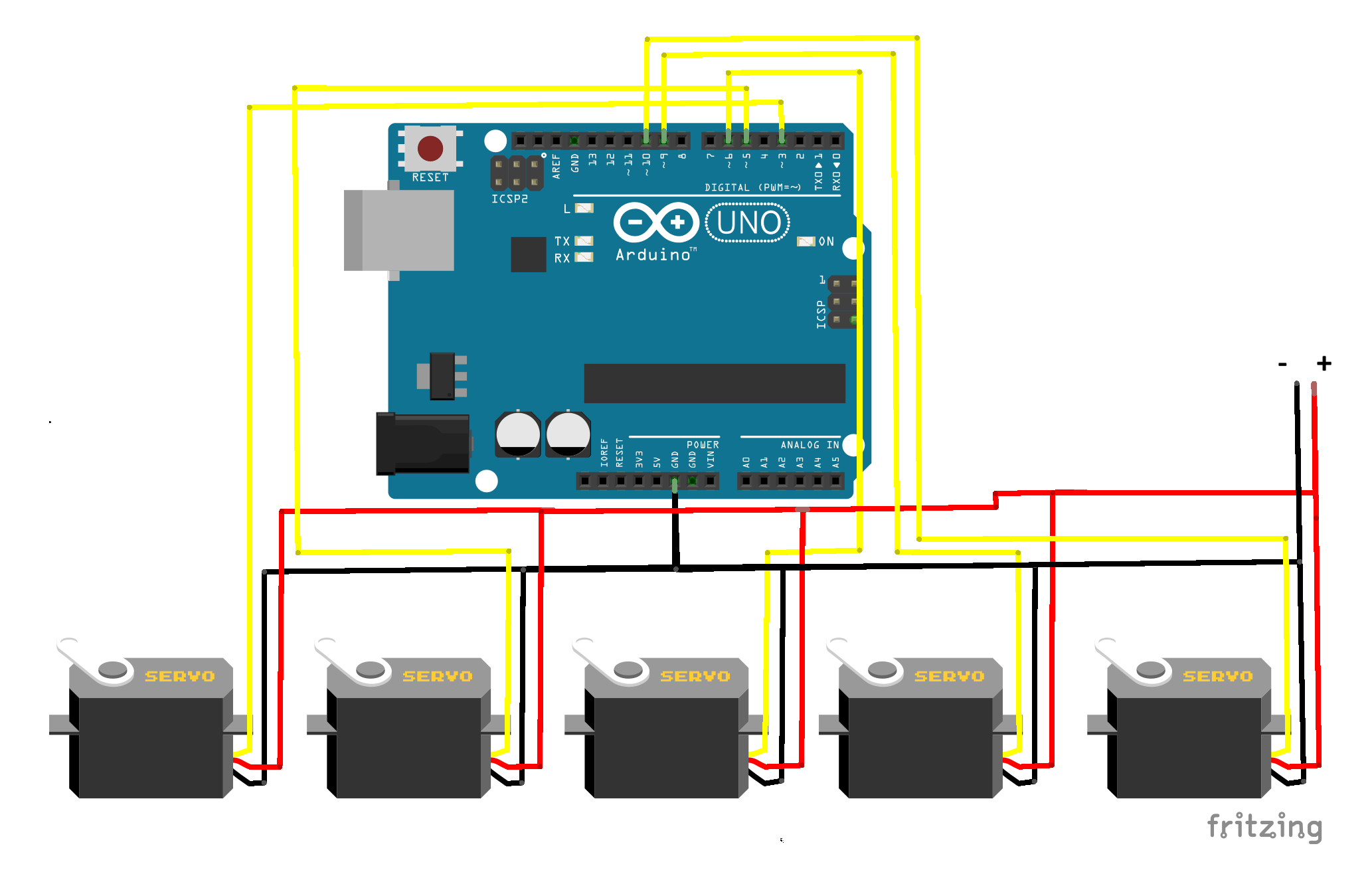
This project demonstrates real-time servo control using computer vision and hand tracking. A webcam detects hand movements using MediaPipe, and the data is sent to an Arduino Nano, which controls multiple servo motors based on finger positions.
The Python script uses MediaPipe to detect hand landmarks from the webcam. It determines which fingers are up or down and converts this into a binary string. This string is sent via serial communication to the Arduino. The Arduino reads the data and moves the corresponding servos.
#include <Servo.h>

Servo s1, s2, s3, s4, s5;

void setup() {
  Serial.begin(9600);

  s1.attach(3);
  s2.attach(5);
  s3.attach(6);
  s4.attach(9);
  s5.attach(10);
}

void loop() {
  if (Serial.available() >= 5) {

    char f1 = Serial.read();
    char f2 = Serial.read();
    char f3 = Serial.read();
    char f4 = Serial.read();
    char f5 = Serial.read();

    s1.write(f1 == '1' ? 180 : 0);
    s2.write(f2 == '1' ? 180 : 0);
    s3.write(f3 == '1' ? 180 : 0);
    s4.write(f4 == '1' ? 180 : 0);
    s5.write(f5 == '1' ? 180 : 0);
  }
}
import cv2
import mediapipe as mp
import serial
import time

arduino = serial.Serial('COM4', 9600)
time.sleep(2)

mp_hands = mp.solutions.hands
hands = mp_hands.Hands(
    min_detection_confidence=0.7,
    min_tracking_confidence=0.7
)

mp_drawing = mp.solutions.drawing_utils
cap = cv2.VideoCapture(0)

def detect_fingers(lm):
    fingers = []

    fingers.append(1 if lm.landmark[4].x < lm.landmark[3].x else 0)
    fingers.append(1 if lm.landmark[8].y < lm.landmark[6].y else 0)
    fingers.append(1 if lm.landmark[12].y < lm.landmark[10].y else 0)
    fingers.append(1 if lm.landmark[16].y < lm.landmark[14].y else 0)
    fingers.append(1 if lm.landmark[20].y < lm.landmark[18].y else 0)

    return fingers

while True:
    success, img = cap.read()
    if not success:
        break

    img = cv2.flip(img, 1)
    rgb = cv2.cvtColor(img, cv2.COLOR_BGR2RGB)
    results = hands.process(rgb)
    img = cv2.cvtColor(rgb, cv2.COLOR_RGB2BGR)

    if results.multi_hand_landmarks:
        for hand_landmarks in results.multi_hand_landmarks:

            mp_drawing.draw_landmarks(
                img,
                hand_landmarks,
                mp_hands.HAND_CONNECTIONS
            )

            fingers = detect_fingers(hand_landmarks)
            data = ''.join(map(str, fingers))
            arduino.write(data.encode())

    cv2.imshow("Hand Tracking", img)

    if cv2.waitKey(1) & 0xFF == 27:
        break

cap.release()
arduino.close()
cv2.destroyAllWindows()